








A Practical Guide to Choosing AI Note Tools Without Overbuilding
The digital age has ushered in an unprecedented volume of information, making effective note-taking more crucial than ever for professionals, students, and creatives alike. Artificial intelligence (AI) has emerged as a powerful ally, promising to revolutionize how we capture, organize, and retrieve information with remarkable efficiency. From transcribing lengthy meetings and lectures to summarizing complex documents and brainstorming sessions, AI note tools offer a suite of capabilities that can significantly enhance productivity, deepen understanding, and streamline workflows across various domains. However, the rapid proliferation of these sophisticated tools also presents a unique challenge: choosing the right one without succumbing to the allure of excessive features that ultimately complicate rather than simplify your workflow.
Many users, eager to leverage the latest technological advancements, often find themselves overwhelmed by tools packed with functionalities they rarely use. This phenomenon, which we term the “overbuilding” trap, frequently leads to increased cognitive load, steeper learning curves, and often, a frustrating return to simpler, less feature-rich methods. Our primary goal in this comprehensive guide is to help you navigate this increasingly complex landscape, focusing on a practical, needs-driven approach to selecting an AI note tool. We aim to empower you to make an informed decision that aligns precisely with your actual requirements, ensuring that your chosen tool genuinely augments your productivity without introducing unnecessary complexity or digital clutter.
Defining Your Core Needs: Beyond the Hype
Before diving into the myriad of AI note-taking solutions available on the market, the most critical first step is to clearly define what you genuinely need from such a tool. Resist the urge to be swayed by persuasive marketing hype or the impressive, often overwhelming, feature lists of advanced applications. Instead, take a thoughtful moment to reflect deeply on your current note-taking habits, the specific types of information you typically process, and the precise pain points you hope to address with AI assistance. Are you primarily looking to accurately transcribe spoken words from meetings, efficiently summarize lengthy articles or research papers, meticulously organize vast amounts of research data, or simply capture fleeting ideas and inspirations more effectively and retrieve them later with ease?
Consider the specific context in which you most frequently take notes. Are you a university student attending demanding lectures, a busy professional participating in frequent virtual or in-person meetings, a dedicated researcher compiling extensive data, or a creative individual brainstorming innovative ideas? Each distinct scenario typically demands a different set of functionalities and priorities from an AI note tool. By pinpointing your core requirements with precision, you establish a clear and objective set of criteria against which to evaluate potential tools, effectively preventing feature bloat from clouding your judgment and leading you astray.
- **Meeting Minutes**: Automated transcription, speaker identification, action item extraction, summary generation.
- **Academic Research**: Summarization of papers, citation management, cross-referencing, concept mapping.
- **Creative Brainstorming**: Idea capture, mind mapping, tag-based organization, visual note-taking.
- **Personal Journaling**: Voice-to-text, sentiment analysis, secure storage, reflective prompts.
Understanding AI Note Tool Capabilities: A Spectrum of Features
AI note tools offer a remarkably diverse range of capabilities, each meticulously designed to address specific aspects of information management and knowledge organization. Understanding this broad spectrum is absolutely crucial for effectively matching the right tools to your precisely defined needs. At the simpler end of the spectrum, many tools provide basic yet powerful AI-powered transcription, converting spoken words into text with varying degrees of accuracy and speed. This foundational feature is often significantly augmented by advanced functionalities such as speaker identification, precise timestamping, and the invaluable ability to search within both the audio recordings and the transcribed text, making information retrieval much more efficient.
Moving up the complexity scale, you’ll discover tools that incorporate sophisticated natural language processing (NLP) techniques to offer advanced summarization, adeptly extracting key points and core arguments from lengthy texts or extended conversations. Some of these tools can even intelligently identify action items, recognize specific entities (like names, places, organizations, and dates), and even gauge the sentiment expressed within the notes. While these advanced features can undoubtedly be powerful and transformative, it’s vital to critically assess whether they genuinely contribute to your specific workflow or merely add unnecessary layers of complexity that you won’t fully utilize in your day-to-day tasks.
- **Automated Transcription**: Converts audio to text, often with speaker separation and timestamping.
- **Summarization**: Condenses long texts or conversations into concise, actionable key points.
- **Action Item Detection**: Identifies tasks, responsibilities, and deadlines from discussions.
- **Entity Recognition**: Highlights names, dates, locations, organizations, and other key entities for quick reference.
- **Semantic Search**: Allows searching by concept and meaning rather than just exact keywords, offering deeper insights.
- **Smart Tagging/Categorization**: Automatically assigns relevant tags or categories based on content analysis.

Evaluating Simplicity and User Experience: The Overbuilding Trap
The allure of a tool packed with every conceivable feature can be incredibly strong, often promising a solution for every potential need. However, experience consistently shows that the most effective tools are those that prioritize simplicity, clarity, and an intuitive user experience above all else. An overly complex interface, even when housing powerful AI capabilities, can quickly lead to user frustration, a steep and time-consuming learning curve, and ultimately, the abandonment of the tool altogether. When evaluating potential AI note tools, pay exceptionally close attention to how easily and naturally you can perform your core tasks. Is the navigation straightforward and logical? Are the AI features accessible without multiple clicks, obscure menus, or requiring extensive prior knowledge?
A tool that is genuinely easy to learn, pleasant to interact with, and enjoyable to use will integrate far more seamlessly into your daily routine, fostering consistent adoption and long-term engagement. Look for clean, uncluttered designs, logical layouts that guide you effortlessly, and minimal visual distractions that could impede your focus. Consider whether the tool offers customizable views, templates, or shortcuts that can further simplify and personalize your specific workflows. Remember, the overarching goal is to enhance your productivity and reduce friction, not to spend valuable time deciphering an overly intricate system. A tool that feels natural, unobtrusive, and genuinely helpful is far more valuable and sustainable than one that merely boasts an exhaustive list of features you’ll never fully leverage.
Data Privacy and Security: Non-Negotiables for Your Notes
In an era where personal and professional data is increasingly vulnerable to breaches and misuse, the privacy and security of your notes should be an absolutely paramount concern. Your notes often contain highly sensitive information, proprietary intellectual property, confidential business strategies, or deeply personal reflections that demand the most robust protection available. Before committing to any AI note tool, it is imperative to thoroughly investigate its data privacy policies and the security measures it employs. Understand precisely where your data is stored, who has access to it under what circumstances, and how it is meticulously encrypted both in transit (as it moves across networks) and at rest (when stored on servers).
Look for tools that explicitly offer end-to-end encryption, implement strong two-factor authentication (2FA) for access, and provide clear, unambiguous policies regarding data ownership, retention, and deletion. Be particularly wary of services that seem overly eager to use your data for “improving their AI models” without offering explicit, granular consent options and clear, easily accessible opt-out mechanisms. Prioritize tools that are transparent about their data handling practices and demonstrate full compliance with relevant international and regional privacy regulations such as GDPR (General Data Protection Regulation) or CCPA (California Consumer Privacy Act). Sacrificing security for the sake of advanced features is a compromise that can have significant and irreversible long-term repercussions, making it a non-negotiable aspect of your selection process.
Integration with Existing Workflows: Seamless Adoption
An AI note tool, no matter how powerful or feature-rich it may appear in isolation, will only be truly effective and valuable if it integrates smoothly and harmoniously with your existing digital ecosystem. Take a moment to consider the other essential applications and platforms you use daily – this might include your calendar, project management software, cloud storage services, communication tools like Slack or Microsoft Teams, or even CRM systems. Does the AI note tool offer robust integrations or well-documented APIs that allow for seamless data flow and interoperability between these critical systems? The ability to effortlessly export notes to your preferred document format, share them directly to a team chat channel, or link them directly to a task in your project board can significantly enhance overall efficiency and prevent information silos.
Avoid tools that inadvertently create information silos, forcing you to manually transfer data, copy-paste content, or constantly switch between disparate and unconnected applications. Such friction points and manual overhead can quickly negate any productivity gains offered by the AI features, turning a potential asset into a cumbersome chore. Look for features like direct sharing options to popular platforms, pre-built integrations with services like Zapier or IFTTT for custom automation, or robust API documentation for developers to create bespoke connections. A well-integrated tool acts as a natural and fluid extension of your current workflow, rather than an isolated island of functionality, ensuring that your valuable notes contribute meaningfully and dynamically to your broader productivity framework and collaborative efforts.
Scalability and Future-Proofing: Growing with Your Needs
While focusing intently on your current core needs is undeniably essential for immediate productivity, it is also prudent to consider the long-term scalability and future-proofing of your chosen AI note tool. Your requirements and operational scope may very well evolve over time; you might take on new, more complex projects, expand your team, or delve into entirely different types of information processing and knowledge management. The critical question then becomes: will the tool you select today be able to comfortably accommodate these potential future changes and expansions without requiring a complete and disruptive overhaul of your entire system?
Evaluate the tool’s inherent capacity for growth and adaptation. Does it offer different pricing tiers or subscription levels that unlock more advanced features, higher storage limits, or increased user capacities as your needs inevitably expand? Is the developer actively updating and consistently improving the software, releasing new features, and addressing user feedback, which would indicate a strong commitment to long-term support and continuous innovation? Furthermore, consider the community surrounding the tool – a vibrant and engaged user base often signifies a robust, well-supported, and evolving product. Choosing a tool that possesses the flexibility to grow with you minimizes the significant disruption and effort involved in migrating to an entirely new platform later, thereby ensuring your valuable investment in learning, data, and workflow remains valuable and relevant over an extended period.
Making the Informed Choice: A Step-by-Step Approach
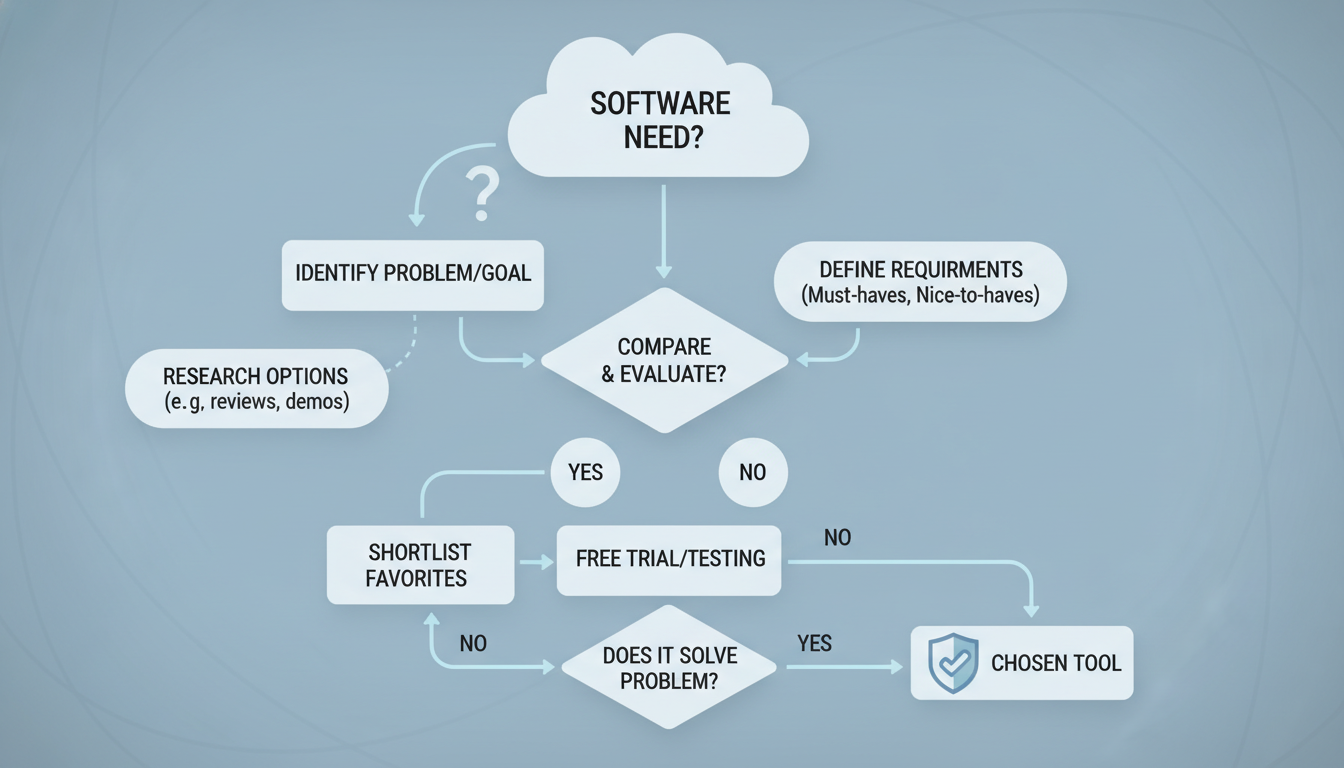
Selecting the ideal AI note tool without overbuilding requires a methodical and thoughtful approach. By systematically evaluating options against your specific, well-defined criteria, you can confidently choose a solution that genuinely enhances your productivity and aligns perfectly with your operational style. Remember, the “best” tool isn’t necessarily the one with the most features or the highest price tag, but rather the one that best fits your unique requirements and seamlessly integrates into your existing workflow. This personalized fit is paramount for long-term satisfaction and effectiveness.
To finalize your decision, consider utilizing a trial period if one is available. Most reputable AI note tools offer free trials or freemium versions, allowing you to test their core functionalities in a real-world context with your actual data and typical use cases. Pay close attention to the ease of use, the accuracy of AI features for your specific content, and how well it integrates with your daily tasks. This hands-on experience is invaluable for confirming your choice and avoiding buyer’s remorse, ensuring your selection is truly informed and practical. By following these steps, you’ll select an AI note tool that is a true asset, not an unnecessary complication.
- **Identify Core Needs**: Clearly list the primary functions you require (e.g., transcription, summarization, organization, specific integrations).
- **Prioritize Simplicity**: Opt for a clean, intuitive interface over feature bloat; ease of use is key to adoption.
- **Verify Data Security**: Confirm robust encryption, transparent privacy policies, and clear data ownership terms.
- **Assess Integration**: Ensure compatibility with your existing tools and workflows to prevent information silos.
- **Consider Scalability**: Look for growth potential, active development, and a clear roadmap for future features.
- **Read Reviews (Critically)**: Consult independent reviews and user testimonials, focusing on reliability and support.
- **Utilize Free Trials**: Test shortlisted tools with your actual data and workflow to gauge real-world performance.
- **Evaluate Support**: Check for responsive customer support, comprehensive documentation, and community resources.
- **Compare Pricing Models**: Understand subscription costs, feature tiers, and overall value relative to your budget.
- **Avoid Overbuilding**: Reconfirm that the chosen tool meets your needs without introducing unnecessary complexity or unused features.