In the dynamic world of content creation, time is your most valuable asset. Whether you’re a blogger, vlogger, podcaster, or social media strategist, the demands on your schedule can feel relentless. From brainstorming and research to creation, editing, and distribution, each step in the creative process can be a significant time sink. But what if there were smarter ways to work? What if you could reclaim hours every week, not by working harder, but by working smarter?
This guide dives into five essential creator workflows that are designed to do just that. We’ll explore practical, actionable strategies that can transform your daily operations, reduce friction, and free up your precious time for what truly matters: creating impactful content and connecting with your audience. Get ready to streamline your process, boost your output, and discover the joy of an optimized creative routine.
1. The Batching Powerhouse Workflow: Create More, More Efficiently
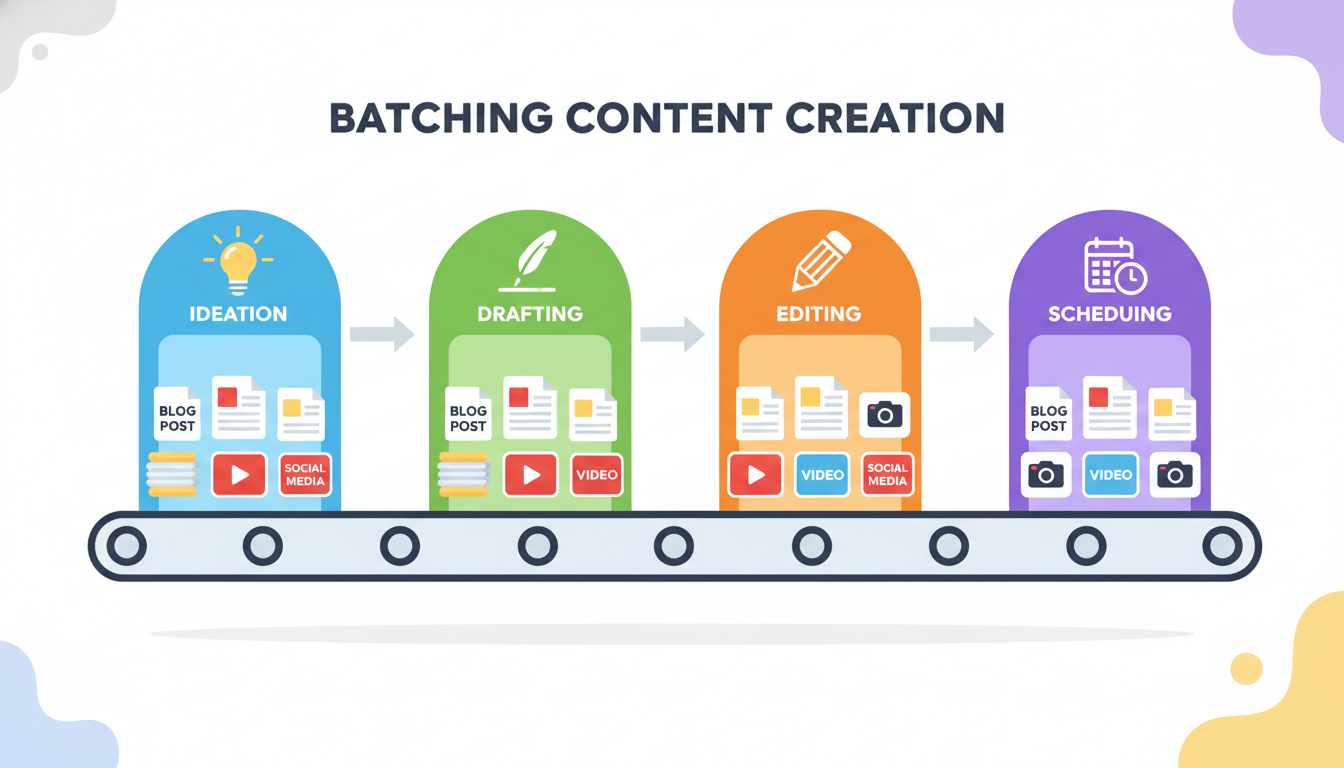
One of the most profound shifts you can make in your creative process is embracing the power of batching. Instead of tackling one piece of content from start to finish before moving to the next, batching involves grouping similar tasks together and completing them all at once. This approach minimizes context switching, which is a notorious productivity killer, and allows you to leverage your focus and momentum.
Think about it: when you switch from writing to editing, then to designing, and back to writing, your brain has to re-engage with different modes of thinking. Each switch costs you time and mental energy. Batching eliminates this by allowing you to stay in one ‘mode’ for an extended period.
How to Implement Batching:
- Content Ideation & Outlining: Dedicate a specific block of time each week or month to brainstorm all your content ideas and create detailed outlines for upcoming posts, videos, or podcasts. Don’t write anything yet; just focus on the structure and key points.
- Drafting & Writing: Once your outlines are ready, set aside dedicated writing sessions. During these times, focus solely on drafting multiple pieces of content. Don’t edit, don’t research new topics, just write.
- Editing & Proofreading: After drafting, schedule a separate block for editing. Go through all your drafted content with a fresh pair of eyes, focusing purely on refining the language, correcting errors, and ensuring clarity.
- Visual Asset Creation: If your content requires custom graphics, thumbnails, or other visual elements, batch their creation. Design all necessary visuals for your upcoming content in one sitting.
- Scheduling & Distribution: Once everything is created and polished, batch the scheduling of your content across all relevant platforms. Use scheduling tools to automate the release.
Example: Instead of writing a blog post on Monday, designing its graphic on Tuesday, and scheduling it on Wednesday, you could spend Monday morning outlining five blog posts, Monday afternoon drafting them, Tuesday morning designing all five graphics, and Tuesday afternoon scheduling all five posts for the coming weeks. This concentrated effort often yields higher quality work in less overall time.
2. The Automated Content Distribution Workflow: Set It and Forget It
Creating compelling content is only half the battle; getting it in front of your audience is the other. Manually sharing your content across every social media platform, email list, and community can be incredibly time-consuming. This is where automation becomes your best friend. By setting up smart distribution workflows, you can ensure your content reaches its intended audience without constant manual intervention.
The goal here is to leverage tools that connect your content hub (e.g., your blog, YouTube channel, podcast host) to your distribution channels. This not only saves time but also ensures consistency in your publishing schedule and reach.
Key Automation Tools & Strategies:
- IFTTT (If This Then That) or Zapier: These powerful integration platforms allow you to create custom ‘recipes’ or ‘Zaps’ that trigger actions based on specific events. For instance:
- When a new blog post is published on WordPress, automatically create a tweet.
- When a new YouTube video is uploaded, automatically share it on your Facebook Page.
- When a new podcast episode goes live, automatically add it to a specific Slack channel.
- Social Media Schedulers (e.g., Buffer, Hootsuite, Sprout Social): Beyond basic scheduling, these tools often integrate with RSS feeds. You can set them to automatically pull new content from your blog or podcast and queue it for sharing across multiple social platforms.
- Email Marketing Automation: If you have an email list, set up an RSS-to-email campaign. This automatically sends out an email digest whenever new content is published on your blog, keeping your subscribers informed without you lifting a finger.
- Repurposing Tools: Consider tools that can automatically convert your content into different formats. For example, some services can transcribe your podcast episodes into blog posts or create short video clips from longer videos for social media.
The beauty of this workflow is that once it’s set up, it largely runs in the background, freeing you to focus on creating the next piece of content rather than constantly promoting the last one.
3. The Efficient Research & Curation Workflow: Information at Your Fingertips
Every great piece of content starts with solid research. However, the internet is a vast ocean of information, and it’s easy to get lost in the endless scroll. An efficient research and curation workflow ensures you’re gathering relevant information quickly, organizing it effectively, and making it readily accessible when you need it most.
This workflow isn’t just about finding information; it’s about creating a personal knowledge base that fuels your creativity and expertise over time. By systematizing how you consume and store information, you turn casual browsing into a strategic asset.
Steps for a Streamlined Research Process:
- Define Your Research Questions: Before diving in, clearly articulate what you’re looking for. What specific questions do you need to answer? What topics are you exploring? This focus prevents aimless browsing.
- Leverage RSS Feeds & News Aggregators: Subscribe to industry blogs, news sites, and thought leaders via an RSS reader (like Feedly or Inoreader). This centralizes your information intake, ensuring you don’t miss important updates.
- Use Read-It-Later Apps: When you encounter interesting articles or resources but don’t have time to read them immediately, save them to a read-it-later app (e.g., Pocket, Instapaper). Schedule dedicated time later to go through these saved items.
- Implement a Robust Note-Taking System: Whether it’s Evernote, Notion, Obsidian, or a simple document, have a system for capturing key insights, quotes, statistics, and ideas from your research. Tag and categorize your notes for easy retrieval.
- Curate & Organize: Regularly review your saved articles and notes. Delete irrelevant information, synthesize key points, and connect related ideas. This active curation transforms raw data into usable knowledge.
- Create Content Buckets/Folders: Organize your research by content themes or upcoming projects. This makes it easy to pull up all relevant information when you start working on a specific piece of content.
By treating research as a structured process, you’ll spend less time searching and more time synthesizing, leading to richer, more informed content.
4. The Streamlined Feedback & Revision Workflow: Polishing with Precision
Content creation is rarely a solo act, especially if you work with clients, collaborators, or editors. The feedback and revision stage can often become a bottleneck, leading to endless email chains, conflicting comments, and frustrating delays. A streamlined feedback and revision workflow is crucial for maintaining momentum and ensuring your content reaches its highest potential efficiently.
The key here is to centralize communication, clarify expectations, and use tools that facilitate clear, actionable feedback rather than vague suggestions.
Best Practices for Feedback & Revisions:
- Centralize Feedback: Avoid receiving feedback from multiple sources via different channels (email, chat, spoken comments). Designate a single platform for all revisions. Google Docs, Microsoft Word’s Track Changes, Notion, or dedicated proofing tools like Markup.io or Frame.io (for video) are excellent choices.
- Provide Clear Instructions: When sending content for review, clearly state what kind of feedback you’re looking for. Are you seeking structural edits, grammatical corrections, or a general impression? Specify deadlines.
- Use Annotation Tools: Encourage reviewers to use in-document commenting features. This anchors feedback directly to the relevant text or visual, making it much easier to understand and implement.
- Consolidate Feedback: If you receive feedback from multiple people, appoint one person (or yourself) to consolidate it into a single, actionable list. This prevents redundant edits and ensures a cohesive final product.
- Review and Prioritize: Before diving into revisions, read through all feedback. Prioritize changes based on impact and effort. Not every piece of feedback needs to be implemented exactly as suggested; use your judgment.
- Communicate Clearly: If you disagree with a piece of feedback or need clarification, communicate promptly and professionally. Explain your reasoning or ask specific questions to understand the reviewer’s intent.
- Version Control: Always save different versions of your content, especially after major rounds of revisions. This allows you to revert if necessary and track progress.
By adopting these practices, you transform the revision process from a chaotic back-and-forth into a structured, productive collaboration.
5. The “Deep Work” Content Creation Workflow: Guarding Your Focus
In an age of constant notifications and digital distractions, achieving deep, focused work is a superpower for creators. The “Deep Work” workflow, inspired by Cal Newport’s concept, is about intentionally creating an environment and schedule that allows you to concentrate without interruption on cognitively demanding tasks. For creators, this means producing high-quality content more efficiently and with greater creativity.
This workflow isn’t just about blocking out time; it’s about protecting that time fiercely and optimizing your surroundings for peak performance.

Elements of a Deep Work Workflow:
- Schedule Dedicated Deep Work Blocks: Identify your peak productivity times and schedule 2-4 hour blocks specifically for content creation (writing, editing, complex research). Treat these appointments as non-negotiable.
- Eliminate Distractions: During deep work sessions, turn off all notifications (phone, email, social media). Close unnecessary tabs. Consider using website blockers if you’re prone to digital wandering. Inform colleagues or family that you’re unavailable.
- Create a Ritual: Develop a pre-deep work routine that signals to your brain it’s time to focus. This could be making a cup of tea, reviewing your outline, or listening to a specific type of instrumental music. This ritual helps you transition into a focused state more quickly.
- Define Clear Objectives: Before each deep work session, know exactly what you intend to accomplish. “Write blog post X” is better than “work on blog posts.” Specificity drives focus.
- Take Strategic Breaks: Deep work is intense. Schedule short breaks (5-10 minutes) every hour or so to recharge. Step away from your screen, stretch, or grab a drink. Avoid checking social media during these breaks, as it can pull you out of your focused state.
- Review and Reflect: After a deep work session, take a few minutes to review what you accomplished. This reinforces the positive habit and helps you refine your approach for future sessions.
Mastering deep work means you’ll produce higher quality content in less time, feeling more accomplished and less drained at the end of the day.
Beyond the Five: Workflow Optimization Principles
While these five workflows offer specific strategies, the journey to ultimate efficiency is ongoing. Here are some overarching principles to guide your continuous workflow optimization:
- Identify Bottlenecks: Regularly review your entire content creation process. Where do things slow down? What tasks consistently take longer than expected? These are your bottlenecks, and they’re prime candidates for optimization.
- Document Your Processes: Write down the steps for your most frequent tasks. This creates a repeatable system, makes it easier to delegate, and helps you spot inefficiencies. A simple checklist or step-by-step guide can be incredibly powerful.
- Leverage Templates: For recurring content types (blog posts, social media captions, video scripts), create templates. This saves time on formatting and ensures consistency, allowing you to focus purely on the content itself.
- Automate Repetitive Tasks: Beyond content distribution, look for any task you do repeatedly that doesn’t require human creativity or judgment. Can it be automated with a tool or a simple script?
- Outsource or Delegate Wisely: If a task is not in your zone of genius or is highly time-consuming but low-value for you, consider outsourcing it to a freelancer or delegating it to a team member.
- Regularly Review and Refine: Your workflows aren’t set in stone. As your needs change, so should your processes. Schedule quarterly or bi-annual reviews of your workflows to identify what’s working, what’s not, and how you can improve.
Embracing a mindset of continuous improvement will ensure your creative engine runs smoothly and efficiently, adapting to new challenges and opportunities.
Implementing Your New Workflows: A Practical Checklist
Adopting new workflows can feel daunting, but it doesn’t have to be. Start small, be patient, and celebrate incremental improvements. Here’s a checklist to help you get started:
- Choose One Workflow to Start: Don’t try to overhaul everything at once. Pick one workflow (e.g., batching or deep work) that resonates most with your current challenges and focus on implementing it.
- Set a Realistic Timeline: Give yourself a week or two to fully integrate the new workflow into your routine before evaluating its effectiveness.
- Gather Necessary Tools: Identify any software, apps, or physical tools you’ll need for your chosen workflow and set them up.
- Communicate Changes (If Applicable): If your new workflow impacts collaborators or team members, clearly communicate the changes and explain the benefits.
- Track Your Time: For a few days before and after implementing a new workflow, track how you spend your time. This will give you concrete data on the hours you’re saving.
- Be Flexible and Iterate: The first attempt might not be perfect. Be open to adjusting your workflow based on your experience. What works for one creator might need tweaking for another.
- Celebrate Small Wins: Acknowledge when a new workflow successfully saves you time or reduces stress. Positive reinforcement helps build new habits.
Remember, the goal isn’t perfection from day one, but consistent progress towards a more efficient and enjoyable creative life.

Conclusion: Reclaim Your Time, Unleash Your Creativity
The journey of a creator is one of passion, dedication, and constant learning. By strategically implementing these five powerful workflows – batching, automated distribution, efficient research, streamlined feedback, and deep work – you’re not just saving hours; you’re investing in your creative longevity and impact. These aren’t just productivity hacks; they’re fundamental shifts in how you approach your craft, designed to minimize friction and maximize your creative output.
Imagine having more time for brainstorming innovative ideas, engaging with your community, or simply enjoying a well-deserved break. That’s the promise of optimized workflows. Start with one, experiment, adapt, and watch as your creative process transforms from a time-consuming chore into a well-oiled machine. Your audience, and your future self, will thank you for it.