The Most Useful Productivity Systems for Real People
In a world brimming with distractions and endless to-do lists, finding a way to manage your time and tasks effectively isn’t just a luxury; it’s a necessity. Productivity systems promise to bring order to chaos, but with so many options, how do you choose one that actually works for you? This guide cuts through the noise, presenting the most practical and widely applicable productivity systems, complete with clear explanations, real-world examples, and actionable steps. Whether you’re a student, a professional, a parent, or simply someone looking to regain control of their day, there’s a system here that can help you achieve more with less stress.
Why Productivity Systems Matter (and Why One Size Doesn’t Fit All)
Before diving into specific methods, it’s crucial to understand why these systems are so powerful. They aren’t just about doing more; they’re about doing the right things, at the right time, with greater focus and less mental clutter. A good productivity system provides a framework for:
- Clarity: Knowing exactly what needs to be done and why.
- Focus: Minimizing distractions and concentrating on one task at a time.
- Prioritization: Identifying and tackling the most important tasks first.
- Reduced Stress: Offloading mental burdens by externalizing your commitments.
- Progress: Consistently moving towards your goals, big or small.
However, what works for one person might not work for another. Your ideal system will depend on your personality, your work environment, your responsibilities, and even your current life stage. The goal isn’t to rigidly adhere to a system that feels unnatural, but to find or adapt one that genuinely supports your workflow and well-being.
Getting Things Done (GTD): The Art of Stress-Free Productivity
Developed by David Allen, Getting Things Done (GTD) is perhaps the most comprehensive and widely respected productivity methodology. It’s less about specific tools and more about a mindset and a workflow for managing all your commitments, big and small. The core idea is to get everything out of your head and into a trusted system, allowing your mind to focus on execution rather than remembering.
The Five Pillars of GTD:
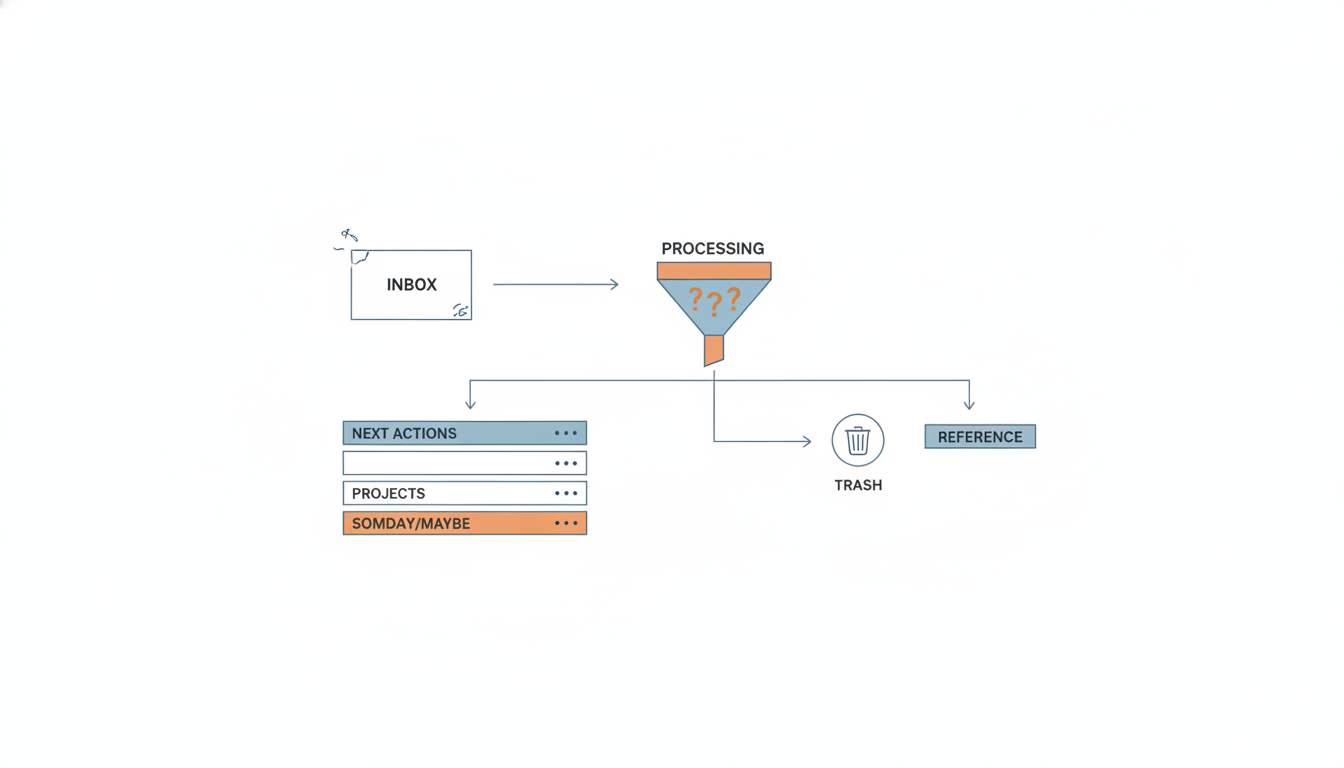
- Capture: Collect everything that has your attention into an ‘inbox’ – physical or digital. This could be ideas, tasks, emails, voicemails, or anything that needs your attention. The key is to get it out of your head.
- Clarify: Process your inbox items one by one. Ask: What is it? Is it actionable? If not, trash it, incubate it (someday/maybe list), or file it for reference. If it is actionable, what’s the next physical action?
- Organize: Put clarified items into appropriate lists or locations. This includes project lists, next actions lists (categorized by context like ‘@computer’ or ‘@errands’), a waiting-for list, and a calendar for time-specific actions.
- Reflect: Regularly review your system. This is crucial. A weekly review helps you get clear, get current, and get creative. It ensures your system stays relevant and you’re working on the right things.
- Engage: Do the work! Based on your context, available time, energy levels, and priorities, choose the next action from your lists and get it done.
GTD is powerful because it provides a complete framework for managing all aspects of your life, from professional projects to personal errands. It takes time to set up and master, but the payoff in reduced stress and increased clarity is immense.
The Pomodoro Technique: Focused Sprints for Maximum Output
If you struggle with procrastination, distractions, or simply maintaining focus for extended periods, the Pomodoro Technique might be your perfect solution. Created by Francesco Cirillo, this method uses a timer to break down work into focused intervals, traditionally 25 minutes in length, separated by short breaks.
How to Implement the Pomodoro Technique:
- Choose a task: Select one specific task you need to work on.
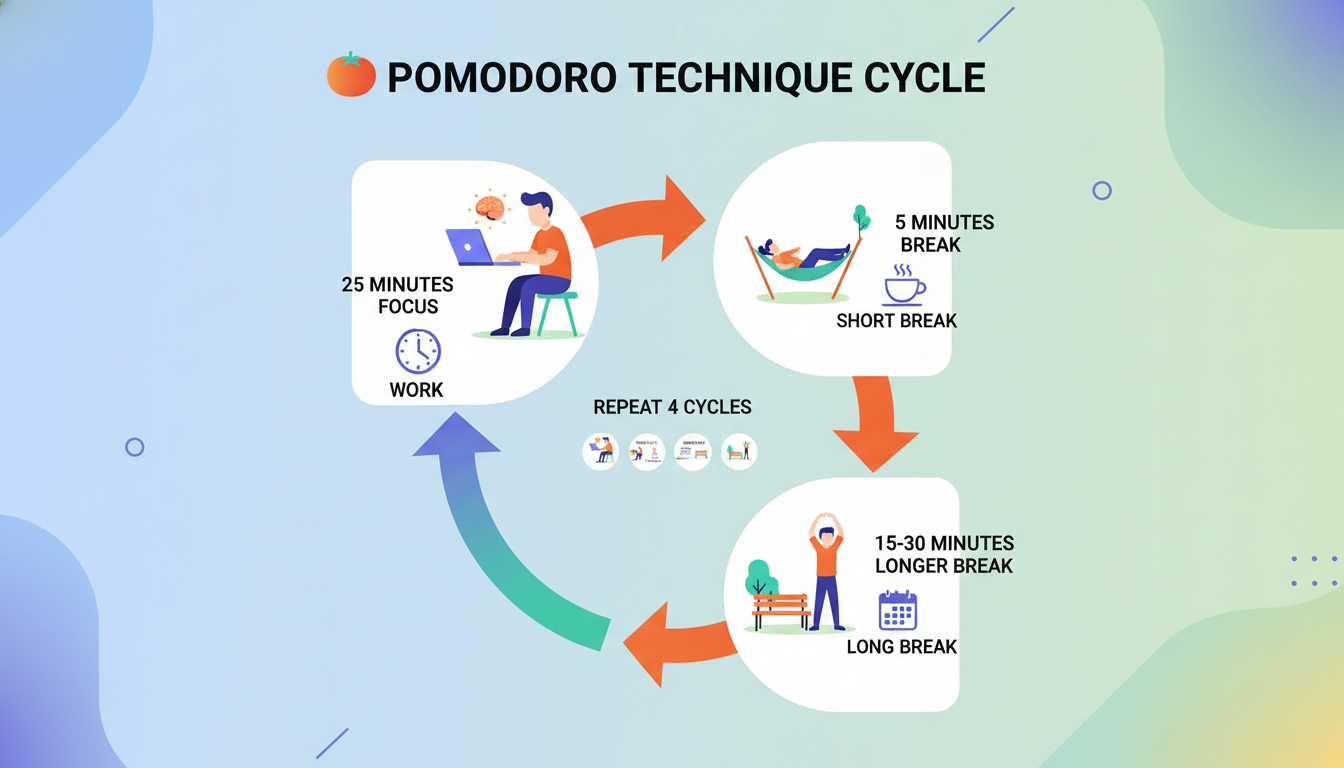
- Set a timer: Set your timer for 25 minutes (this is one ‘Pomodoro’).
- Work with focus: Concentrate solely on your chosen task until the timer rings. If a distraction arises, jot it down and return to your task.
- Take a short break: Once the timer rings, take a 5-minute break. Stand up, stretch, grab a drink – disengage from work.
- Repeat: After four Pomodoros, take a longer break (15-30 minutes).
The beauty of the Pomodoro Technique lies in its simplicity and its ability to train your brain for sustained focus. The short breaks prevent burnout, and the ticking timer creates a sense of urgency that can help overcome procrastination. It’s particularly effective for tasks that require deep concentration, like writing, coding, or studying.
Time Blocking: Scheduling Your Success
Time blocking is a straightforward yet incredibly effective method for managing your schedule. Instead of just having a to-do list, you allocate specific blocks of time in your calendar for specific tasks or types of work. This transforms your calendar from a passive record of appointments into an active roadmap for your day.
The core principle is to treat your own tasks and projects with the same respect you’d give an external meeting. By assigning a dedicated slot, you’re not just saying you’ll do something; you’re deciding when you’ll do it.
Benefits of Time Blocking:
- Enhanced Focus: When a time block begins, you know exactly what you should be working on, reducing decision fatigue.
- Realistic Planning: Forces you to confront how much time tasks actually take, leading to more accurate scheduling.
- Reduced Multitasking: Encourages single-tasking within each block.
- Improved Work-Life Balance: You can block out time for personal activities, exercise, or family, ensuring they don’t get squeezed out.
Start by blocking out your non-negotiable appointments, then allocate blocks for your most important tasks, deep work sessions, communication (emails, calls), and even breaks. Be realistic and allow for some buffer time.
Kanban Method: Visualizing Your Workflow
Originating from Toyota’s manufacturing system, Kanban is a highly visual method for managing work. It’s based on the idea of visualizing your workflow, limiting work in progress, and maximizing efficiency. While often used in software development, its principles are highly adaptable for personal productivity.
The most common implementation involves a Kanban board, which can be physical (a whiteboard with sticky notes) or digital (tools like Trello, Asana, Monday.com). The board typically has columns representing different stages of your workflow, such as:
- To Do: Tasks that are planned but not yet started.
- Doing/In Progress: Tasks you are actively working on.
- Done: Completed tasks.
You move tasks (represented by cards or sticky notes) from left to right as they progress through your workflow. The power of Kanban comes from its visual nature, making it easy to see where tasks are, identify bottlenecks, and understand your capacity.
The Eisenhower Matrix: Prioritizing with Purpose
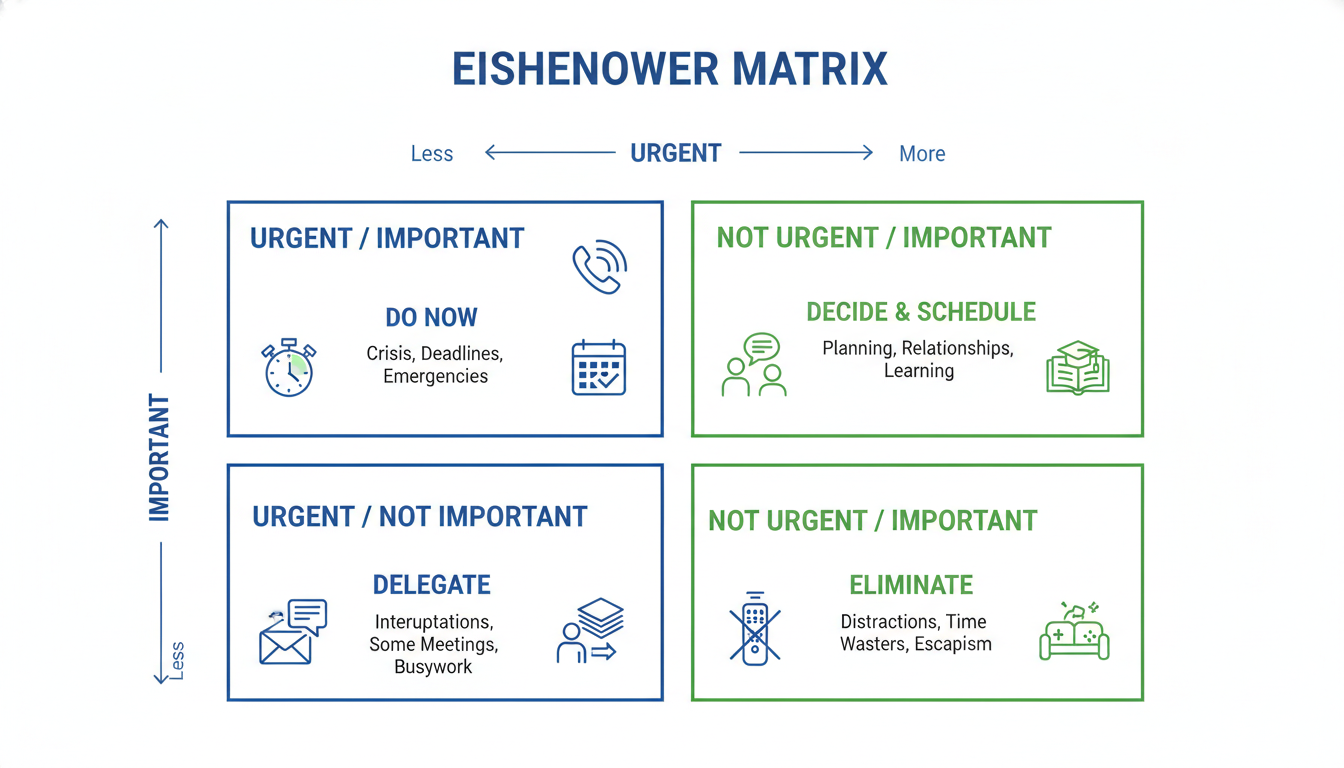
Named after former U.S. President Dwight D. Eisenhower, this simple yet powerful prioritization tool helps you categorize tasks based on their urgency and importance. It’s perfect for when you have a long list of tasks and need to decide what to tackle first.
The Four Quadrants:
- Urgent & Important (Do First): These are crises, deadlines, and problems that require immediate attention. Focus on these tasks first.
- Important, Not Urgent (Schedule): These are tasks related to long-term goals, planning, and prevention. They are crucial for future success but don’t have immediate deadlines. Schedule time for these to prevent them from becoming urgent.
- Urgent, Not Important (Delegate): These are interruptions, some emails, and tasks that feel pressing but don’t contribute significantly to your goals. If possible, delegate these or minimize the time spent on them.
- Not Urgent & Not Important (Eliminate): These are distractions, time-wasters, and trivial activities. Avoid these tasks altogether or drastically limit their presence in your day.
Regularly applying the Eisenhower Matrix helps you shift your focus from reactive (urgent tasks) to proactive (important, not urgent tasks), leading to greater strategic accomplishment and less stress.
Hybrid Approaches and Customization: Making It Yours
While each system offers a robust framework, the true magic often happens when you combine elements that resonate with you. You don’t have to pick just one system and stick to it rigidly. Many people find success by creating a hybrid approach tailored to their unique needs.
- You might use GTD for overall task management and project organization, but apply the Pomodoro Technique for focused work sessions within those projects.
- You could use Time Blocking to schedule your day, and then use a Kanban board to visualize the progress of your key projects within those blocks.
- The Eisenhower Matrix can be a powerful tool during your weekly GTD review to help you decide which tasks to prioritize for the upcoming week.
The key is experimentation. Try a system for a few weeks, observe what works and what doesn’t, and then adjust. Don’t be afraid to modify rules, combine techniques, or even invent your own variations. Your productivity system should serve you, not the other way around.
Implementing and Sustaining Your System: Practical Tips for Success
Choosing a system is just the first step. The real challenge and reward come from consistently implementing and refining it. Here are some practical tips to help you make your chosen system (or hybrid) a lasting success:
Start Small and Be Patient:
Don’t try to overhaul your entire life overnight. Pick one system or one core principle and integrate it gradually. It takes time to build new habits and for a system to feel natural. Expect a learning curve and be kind to yourself during the process.
Choose the Right Tools (But Don’t Over-Optimize):
Whether it’s a simple notebook, a digital task manager (like Todoist, TickTick, Notion), a calendar app, or a physical whiteboard, choose tools that you’ll actually use. The best tool is the one that you find intuitive and accessible. Avoid getting caught in ‘tool paralysis’ – spending more time researching tools than actually doing work.
Schedule Regular Reviews:
This is perhaps the most critical component for any system’s longevity. A weekly review (as emphasized in GTD) is invaluable. Use this time to:
- Clear out all your inboxes.
- Review your calendar for the past and upcoming weeks.
- Look over all your project and task lists.
- Update priorities and next actions.
- Reflect on what worked and what didn’t.
This ensures your system remains current, relevant, and trustworthy.
Be Flexible and Adaptable:
Life happens. There will be days when your perfectly planned schedule goes awry. Don’t abandon the system entirely. Instead, adapt. Acknowledge the disruption, make necessary adjustments, and get back on track as soon as you can. Your system should be a guide, not a rigid dictator.
Celebrate Small Wins:
Acknowledge your progress. Every completed task, every cleared inbox, every focused work session is a step forward. Celebrating these small wins can provide the motivation to keep going, especially when you’re feeling overwhelmed.
Conclusion: Your Path to Sustainable Productivity
Productivity isn’t about working harder; it’s about working smarter, with intention and clarity. The systems outlined here – GTD, Pomodoro, Time Blocking, Kanban, and the Eisenhower Matrix – offer proven frameworks to help you achieve that. Remember, the goal isn’t perfection, but consistent progress and a greater sense of control over your time and tasks.
Experiment, adapt, and personalize these methods to fit your unique life. By investing in a reliable productivity system, you’re not just organizing your to-do list; you’re investing in your peace of mind, your goals, and ultimately, a more fulfilling and less stressful life. Start today, and discover the power of working with purpose.